
Apps proliferate amid concerns about medical use


EXPERT ANALYSIS FROM THE ANNUAL MEETING OF THE AMERICAN COLLEGE OF EMERGENCY PHYSICIANS
A case that turns an iPhone into an ECG device has been submitted to the FDA for approval. The AliveCor iPhone ECG is expected to sell for between $100 and $200, compared with the usual price tag of thousands of dollars for conventional ECG machines, according to PC Magazine.
One small prospective study of experimental software that programs an iPhone to detect atrial fibrillation by placing a patient’s finger over the camera lens showed it was 98% sensitive and nearly 100% specific in detecting atrial fibrillation (IEEE Trans. Biomed. Eng. 2012 [doi:10.1109/TBME.2012.2208112]).
• Translation: When your hospital’s interpreter isn’t available, a free app like Google Translate can help. You can write or speak in one language and your device will write and say the message in a wide selection of language. You’ll need a wireless Internet connection for some translation apps.
• Eye chart: Your office has an eye chart, but you can’t find it. Pull up an app like the free EyeChart on your smartphone or tablet.
• Light: You want to inspect a patient’s sore throat, but the light in the exam room is broken. Use the flash on your smartphone camera, or use one of many free "flashlight" apps that turn the smartphone screen into a light source. Be sure to turn it off when you’re done, though, or your battery will run down quickly.
• Ultrasound: The miniaturization of ultrasound devices continues, with systems like the Mobisante MoblUS that attaches a probe to show images on your smartphone screen.
• Skin: For better evaluation of skin lesions, turn your iPhone into a dermatoscope by using the DermScope app ($4.99) and attaching the phone to the DermScope hardware (sold separately).
• Decision support: The PediStat app ($2.99 and up) makes it easy to determine the right pediatric drug dosing, among other features. The free Calculate (Medical Calculator) by QxMD app provides quick intuitive guides to common decision rules and can be customized by medical specialty.
• Drugs: Look up drug dosing, side effects, interactions and other information on free apps from Micromedex and others.
• Photos/videos: These apps are handy for documenting and sharing the appearance of a wound, a patients range of motion, or performance on a neurologic exam. Anyone who thinks they see uvula deviation in the throat of a struggling 3-year-old can snap a photo or video for review with other health care providers, medical students, or parents and avoid having to repeat the exam. Images of a wound problem after surgery can be sent to the surgeon when he or she is out of town.
Dr. Broder particularly finds the video useful for children having "pseudoseizures" whose parents demand a neurologic consult, even though the seizure event probably won’t be happening when the neurologist arrives. A video shows the neurologist exactly what Dr. Broder saw. (See the Dos and Don’ts for using photos and videos below.)
Once you’ve got an image or data you want to transmit, avoid texting as first-line means of communication because texts typically are not encrypted. Be careful when e-mailing to make sure it’s going to the correct address and only that address. Use e-mail options such as "confirm delivery" or "request read receipt," and add a sentence to the e-mail saying, "Please delete once no longer necessary for patient care," he advised.
Always document in the patient’s chart that you obtained patient consent and describe what was sent and who received it. Describe any images you send.
Don’t leave images on your portable devices. They’re easily lost, and most have inadequate encryption. Make images part of the medical record by uploading to the patient’s record, printing and scanning, or describing them clearly in the medical record. Then delete them from your device.
Store images and data in "cloud" computing sites with caution, Dr. Broder said. Services such as Google Drive or Dropbox allow sharing of very large files but provide no assurances about the quality of encryption or security. Cloud sites may be best used for giving patients access to instructions, instructional videos, reference papers, anatomic diagrams, etc.
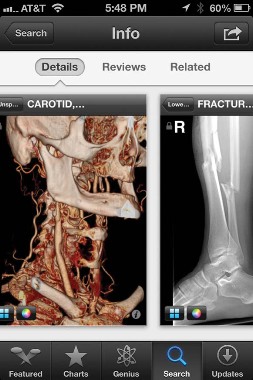
The FDA approved the free Centricity Radiology Mobile Access app, which lets you view CT and MRI images on your iPhone if the images are stored in a GE Centricity PACS (picture archiving and communication system) platform – which may include 20% of U.S. radiology images, according to the company.
|
| Sherry Boschert/IMNG Medical Media A screen shot shows the Centricity Radiology Mobile Access app. |
The free CloudOn app lets you use MS Office software (including Word, Excel, and Powerpoint) on an iPad.

