
Take charge of your e-mail!


ABSTRACTAlthough e-mail is supposed to help save time and increase efficiency, for many it has become a burden. You can fight e-mail overload by taking steps to decrease the amount of unwanted e-mail you receive and by managing your in-box in an organized manner.
KEY POINTS
- Decrease the amount of unwanted e-mail by zealously guarding your e-mail address, separating work e-mail from personal e-mail, and encouraging coworkers to follow appropriate e-mail etiquette.
- Handle the messages you receive in a disciplined and consistent manner. Schedule regular times to deal with e-mail.
- Delete spam messages without viewing images and without clicking on links. File any information that may be needed later. Messages that need action require one of the “four Ds”: delete it, do it, delegate it, or defer it.
- Never open a message and then close it without doing anything about it.
Prevent spammers from harvesting your e-mail address
Since a spammer first has to harvest your e-mail address, you should try not to give it away. Spammers use programs that troll the Internet looking for e-mail addresses. Tips for guarding your address:
- Try not to display it in public, eg, in chat rooms, message boards, listservs
- If you have to post your e-mail address in public, reformat it so it cannot be easily recognized as an e-mail address by the trolling software (see sidebar, “More ways to outsmart the spammer”)
- Check a Web site’s privacy policy before submitting your information
- Take the time to review “opt-out” options on Web sites you use, to prevent your e-mail address from being used by a third party
- Consider using separate e-mail addresses for your personal business and your work to limit spam in your workplace: to prevent unintended disclosure of your work address, give your family and friends only your personal e-mail address, and ask them to use “blind copy” so that other recipients don’t have access to it
- Consider using “disposable” e-mail addresses, especially when making on-line purchases or when requesting services.
Prevent spammers from confirming your e-mail address
If spammers do obtain your e-mail address, you can prevent them from verifying it:
- Do not reply to or click on any links in a spam or other unsolicited e-mail message, including links to “unsubscribe” from an unsolicited newsletter, chain letter, or special offer
- Set your e-mail application to display messages in plain text rather than HTML, or turn off the automatic images in your e-mail application: the opening of the e-mail and subsequent displaying of the images can automatically verify your address to the sender!
- Check your e-mail application to ensure that it sends automatic “out of office” or “vacation” replies only to your contacts or ask your e-mail administrator for help with this at your workplace.
Keep spam out of your in-box
Finally, if spam is sent, there are several ways to keep it from reaching your in-box:
- Sophisticated users can use e-mail rules to direct spam-marked e-mail to a separate junk folder
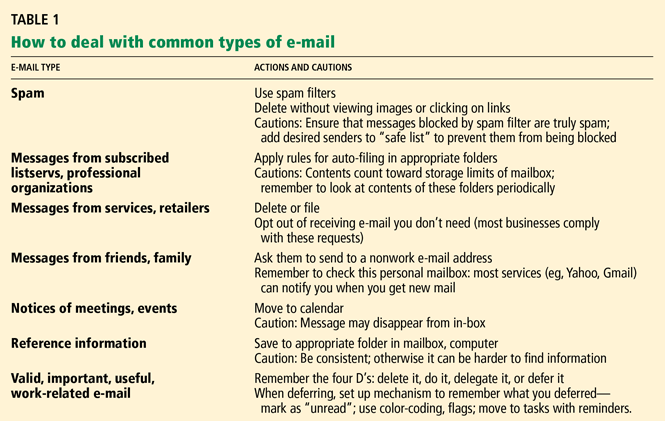
- Add frequent unsolicited e-mail senders to a “blocked sender” list (Table 1).
A WORD ABOUT ‘PHISHING’
Like spam, “phishing” is a form of unsolicited e-mail, but its intent is much more malignant. The perpetrator sends out legitimate-looking e-mail in an attempt to gather personal and financial information from recipients. Typically, the messages appear to come from well-known and trustworthy Web sites such as banks, Pay-Pal, eBay, MSN, or Yahoo, and they ask the recipient for an account number and the related password. For more on this topic, see https://en.wikipedia.org/wiki/Phishing.
GOOD MANNERS IN THE E-WORKPLACE
Even if you could block all spam messages from reaching your inbox, you still might receive unwanted messages from colleagues or friends. The only way to reduce unnecessary e-mail in the workplace is to ask your colleagues and employees to use e-mail appropriately. Here are some rules that could help decrease e-mail overload at your work:
Do not overuse “reply to all.” This is one of the most common reasons for e-mail overload in the workplace. Only use “reply to all” if you really need your message to be seen by each person who received the original message.
Use “cc:” sparingly. Try not to use the “cc:” field unless the recipients in that field know they are receiving a copy of the message. It also exposes the e-mail identity of other users and can promote spam, especially if you are sending e-mail to an external client.
Do not forward chain letters. It is safe to say that all chain letters are hoaxes. Just delete them as soon as you receive them.
Use alternate means of communication (eg, phone, meetings) if you really need to have a discussion. E-mail is not the richest medium for discussion, and sometimes it is better to talk to a person or group face to face or on the phone rather than to bounce e-mail back and forth multiple times between multiple users.
Use appropriate subject headings like “no response needed” or “FYI-Reference” when you don’t need a reply. For example, someone asks you to send a file by e-mail; you send it as an attachment, and in the subject line you say, “Here is the file you wanted. NRN.” The recipient will know not to respond with “Got it, thanks” or something like that. He can thank you when you next see him.
Avoid sending unnecessary attachments. Suppose you want to inform some colleagues about a visiting professor giving a grand rounds talk. Instead of creating a Word document and attaching it to the e-mail message, you can include the information in the body of the message itself. Thus, the recipients will not have to go through the additional step of opening the attachment. Also, the plain text message in the body of the message will be a smaller file than an e-mail message with an attached Word document.
Do not request delivery notification. This is irritating to most users, requiring an extra click before reading the message. It may not work with all e-mail clients, and a user can elect not to send the notification. And what would you do with such information anyway (especially if it is incomplete)?
Use a meaningful subject header. This will allow the user to decide whether and when to open the message.
Do not abuse the “urgent” or “high priority” flag. This is like crying wolf and diminishes the user’s ability to effectively manage his or her e-mail.
Anticipate and preempt e-mail volleys. Suppose a journal editor e-mails you to ask if you can review an article that was submitted to the journal, and says that your review would need to be completed by next month. You respond that you cannot do it within that time frame, but that you could do it the month after that. Anticipating the next question, you also provide the names of two colleagues who might be able to do the review. This will prevent any further e-mail on this topic unless the editor is willing to wait longer to get your review.
Maintain e-mail threads if possible. When responding to an e-mail message, use “reply” instead of starting a new message. This will maintain the thread of the discussion and make it easier to follow.
Do not send an e-mail message when you are angry or upset. It is better to wait until you calm down (sleep on it if possible) and then write the message or have a conversation on the phone or face to face. Nothing good comes out of writing an e-mail message in the heat of the moment, and it only leads to bad feelings and miscommunication. Along the same line, avoid sarcasm or humor in professional e-mail, as it can be misconstrued.
Avoid putting information in e-mail that you do not want unintended parties to read
It is only too easy to forward or share the e-mail message with others.
Avoid sending confidential patient information in e-mail unless your institution has set up some ground rules. The American Medical Informatics Association has issued guidelines on this topic.9


